Key takeaways
- Smallest: Lenovo Tiny models, Dell Micro, Mac mini.
- Most upgradeable: Lenovo M70t Gen 6 (up to 128GB RAM, four drives).
- macOS: Mac mini only.
- Lowest entry price tier: Lenovo neo 50q, then Mac mini M6 at a reported $899.
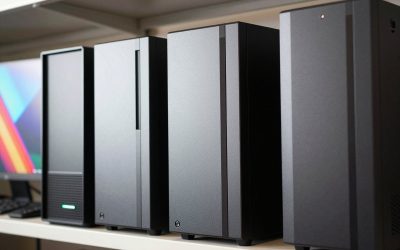
A home office desktop has a different job than a gaming rig. It needs to stay quiet, fit on a small desk, run a dozen browser tabs, video calls and spreadsheets without fuss, and keep working for years. This guide looks at the best desktop computers for a home office in 2026 and covers six options: one Apple Mac mini, three Lenovo ThinkCentre models and two Dell Pro models. We explain who each one suits and where the limits are.
A note on method: we have not tested any of these computers. Everything below comes from published specs, manufacturer documentation (Apple, Lenovo PSREF, Dell) and reviewer and retailer listings, not hands-on testing. We make no claims about noise levels, speed in specific programs or benchmark scores because our sources do not give verified numbers. Prices are approximate and were not live-checked, and they change often, so confirm the configuration and price on the seller’s page before you buy.
How to Choose a Home Office Desktop
Pick the size first. A mini PC of about 1 liter (Lenovo Tiny, Dell Micro, Mac mini) can sit behind a monitor. A tower is bigger but usually gives you more memory slots, drive bays and room for a graphics card later.
Windows or macOS. If your work depends on Windows-only business software, a ThinkCentre or Dell Pro is the safer path. If you already live in the Apple ecosystem, the Mac mini is the simple choice. Check your employer’s or client’s software requirements before deciding.
What is included. Most of these machines are sold without a monitor, and some bundles omit a keyboard and mouse. Budget for them separately.
Memory and storage. Entry configurations often start at 8GB or 16GB of RAM and a 256GB or 512GB SSD. Where the RAM is socketed (SO-DIMM or DIMM slots) you can add more later. On the Mac it is built in, so choose the amount at purchase.
Ports. Count what you need: two monitors, a webcam, a headset, a printer, wired Ethernet. Business desktops usually include Ethernet; check USB-A versus USB-C if you own older accessories.
Apple Mac mini (2026) – Best Small Desktop for macOS
Apple announced a refreshed Mac mini on August 25, 2026, according to MacRumors. It is offered with an M6 chip (12-core CPU, 12-core GPU) or an M5 Pro chip (15-core or 18-core CPU), with availability from September 22. The M6 model goes up to 32GB of memory and a 2TB SSD, while the M5 Pro goes up to 64GB and 8TB. Reported ports are two front USB-C, a headphone jack, three rear Thunderbolt ports (Thunderbolt 4 on M6, Thunderbolt 5 on M5 Pro), HDMI and Ethernet that is 2.5 Gigabit by default. It supports up to three external displays, plus Wi-Fi 7 and Bluetooth 6. The reported starting price is $899 for the M6 and $1,699 for the M5 Pro. Older M4 models may still turn up at some sellers, so check which chip is in the listing.
Pros: very small, many ports for its size, runs macOS. Cons: memory and storage cannot be upgraded later, and you must supply a monitor, keyboard and mouse. Best for: Mac users who want a compact desk setup. Details come from MacRumors coverage of the announcement, so verify them on Apple’s site. Search Apple Mac mini on Amazon.
Lenovo ThinkCentre M70q Gen 5 Tiny – Best Compact Windows Business PC
This is a roughly 1-liter desktop (about 179 x 182.9 x 36.5 mm) based on the Intel Q670 chipset. Lenovo’s PSREF lists processors up to the Core i7-14700T (20 cores), integrated Intel UHD Graphics 770, two DDR5 SO-DIMM slots for up to 64GB, and up to two M.2 SSDs. One listed model carries a 512GB PCIe 4.0 NVMe drive. A B&H listing mentions Gigabit Ethernet, Wi-Fi 6E, Bluetooth 5.3, HDMI 2.1, DisplayPort 1.4a, USB-C and USB-A.
Pros: small footprint, upgradeable RAM and storage, business-class Windows setup. Cons: integrated graphics only, and it is a 14th-gen platform, so supply may be thinning. Best for: a tidy Windows desk where you want to upgrade memory later. Search Lenovo ThinkCentre M70q Gen 5 on Amazon.
Lenovo ThinkCentre neo 50q Gen 5 – Best Lower-Cost Mini Option
The neo 50q Gen 5 is a Tiny (1L) machine of about 1.13 kg. Lenovo lists Core i3-1315U, Core 5 210H and Core 7 240H options, two DDR5 SO-DIMM slots with up to 64GB, and up to two 1TB M.2 SSDs. A separate Snapdragon X version exists with soldered memory, so confirm the processor before buying if you need the usual Windows app compatibility. An Amazon listing shows an i3 configuration with 16GB and 512GB, wired keyboard and mouse included and Windows 11 Pro.
Pros: small, upgradeable memory, entry price tier. Cons: mobile-class processors, and the variants differ a lot, so read the listing carefully. Best for: email, documents, web apps and video calls on a budget. Search Lenovo ThinkCentre neo 50q Gen 5 on Amazon.
Lenovo ThinkCentre M70t Gen 6 – Best Expandable Tower
Per Lenovo’s PSREF, this 13.6L tower goes up to a Core Ultra 7 265 (20 cores, up to 5.3GHz, 13 TOPS NPU) on an Intel Q870 chipset. It has four DDR5 UDIMM slots for up to 128GB, one PCIe 4.0 x16 slot, two PCIe 3.0 x1 slots, and room for up to four drives (one 3.5-inch, one 2.5-inch and two M.2 SSDs). Graphics are integrated or up to an NVIDIA GeForce RTX 3050 6GB. The OS is up to Windows 11 Pro.
Pros: the most room to grow in this list, with plenty of memory slots and drive bays. Cons: larger than the minis, and we did not confirm current pricing. Best for: people who want to add drives or a graphics card down the road. Search Lenovo ThinkCentre M70t Gen 6 on Amazon.
Dell Pro Tower QCT1250 – Best Dell Tower
This is Dell’s current business tower in the line that follows OptiPlex. Dell lists Core Ultra 3 205 through Core Ultra 7 265 options at 65W, plus some 14th-gen configurations. It is a chassis of about 14.6L with DDR5 memory (a retailer lists 64GB maximum), SSD choices of 256GB or 512GB or a 2TB hard drive, and a 180W or 360W power supply. Integrated graphics are standard, with optional RTX 3050 or RTX 4060 listings reported. Front ports include USB-C, USB-A and a headset jack, with HDMI 2.1, DisplayPort 1.4a and Gigabit Ethernet at the back. Some retailers mark certain SKUs as end-of-life, so check availability.
Pros: familiar business build, optional discrete graphics, TPM 2.0. Cons: some front ports are only USB 2.0, and stock can vary by SKU. Best for: a conventional desktop with room to expand. Search Dell Pro Tower QCT1250 on Amazon.
Dell Pro Micro QCM1250 – Best Dell Mini
The Micro is the small sibling. Retailer listings show Core Ultra 5 235T and an Intel Q870 chipset, SO-DIMM DDR5 memory and Wi-Fi 6E, with a Core Ultra 7 265 variant also listed. We could not confirm a full manufacturer spec sheet in our research, so treat these details as retailer-reported and check Dell’s page.
Pros: small footprint, Dell business support options. Cons: limited verified specs, and some stores list it as end-of-life. Best for: offices already standardized on Dell. Search Dell Pro Micro QCM1250 on Amazon.
Near Fit: HP Elite Mini 800 G9
The HP Elite Mini 800 G9 is a well-reviewed small business PC (Intel Q670, DDR5-4800 in two SO-DIMM slots up to 64GB, two M.2 slots, Windows 11 Pro). It is an older generation, and we could not confirm current availability, so we left it out of the main list.
Quick Comparison
- Smallest: Lenovo Tiny models, Dell Micro, Mac mini.
- Most upgradeable: Lenovo M70t Gen 6 (up to 128GB RAM, four drives).
- macOS: Mac mini only.
- Lowest entry price tier: Lenovo neo 50q, then Mac mini M6 at a reported $899.
Frequently Asked Questions
Do I need a monitor, keyboard and mouse?
Usually yes. Most of these desktops ship as the computer alone, though some retail bundles include a wired keyboard and mouse. Check the listing.
Is a mini PC powerful enough for office work?
For documents, web apps, spreadsheets and video calls, the processors listed here are sensible choices on paper. We have not benchmarked them, so check reviews if you do heavy video or data work.
How much RAM should I get?
Many entry configurations start at 8GB or 16GB. Choose more if you keep many apps open, and prefer a model with RAM slots so you can add more later. The Mac mini cannot be upgraded after purchase.
Windows or Mac for a home office?
It depends on the software you must run. Confirm requirements with your employer or clients first; the hardware is capable either way.
Write Your Review
No reviews yet. Be the first to share your experience!