“Best mic for vlogging” doesn’t have one single answer, because vlogging itself covers very different shooting styles — a desk-based talking-head channel has different audio needs than a walk-and-talk travel vlog. The honest answer is that most vloggers eventually end up choosing between two categories: a wireless lavalier system that clips to clothing and stays close to your mouth no matter where you walk, or an on-camera shotgun mic that mounts to the hot shoe and points at whatever the camera is pointed at.
If you move around while filming — walking through a city, cooking, exercising — wireless lav wins because distance from the camera doesn’t degrade your audio. If you’re mostly stationary relative to the camera, an on-camera shotgun mic is simpler to operate, has no battery pairing to manage, and is usually cheaper for comparable audio quality.
There’s also a hybrid approach worth knowing about: some creators keep both an on-camera shotgun mic and a wireless lav on hand, switching depending on the day’s shoot. This isn’t necessary when you’re starting out, but it explains why many established vloggers eventually own more than one microphone rather than finding a single “best” one that covers every situation.
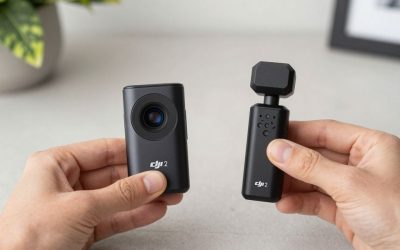
DJI Mic Mini (Wireless pick)
For mobile vlogging, the Mic Mini is a strong starting point — small 10-gram transmitters, roughly 400-meter range, and a 48-hour case battery that covers weeks of casual use. It includes noise cancellation and automatic limiting, features that used to be reserved for pricier systems.
Hollyland Lark M2 (Wireless pick)
A step up for vloggers who want two-person capability — useful the moment you start doing interviews or duo content — with a claimed 1,000-foot range and roughly 40 hours of case battery. It undercuts premium brands by a meaningful margin while staying genuinely usable for daily vlogging.
RODE Wireless GO II
One of the most established names in compact wireless systems for creators, offering dual-channel recording (both transmitters recorded to separate tracks) which gives you more flexibility in editing if one person is louder than the other, or if you want to mute one mic without re-recording.
BOYA Mini 2 (Budget wireless pick)
For vloggers on a tight budget who still want real wireless lav performance rather than relying on a phone or camera mic, the Mini 2’s 5-gram transmitters and AI noise cancellation deliver solid results for well under $50.
RODE VideoMicro II (On-camera pick)
If you’re mostly stationary relative to your camera, skip wireless entirely and mount this directly to your hot shoe. No battery, no pairing, no range limit to worry about — just consistently clean audio for a very reasonable price.
Saramonic Blink 500 B2
Saramonic’s Blink 500 B2 is a budget two-transmitter wireless kit that regularly appears alongside BOYA and DJI in vlogging mic comparisons. It covers the core need — clear, untethered audio — without the premium pricing of DJI Mic or Hollyland, making it a sensible starting point before upgrading to a flagship wireless system.
Deity V-Mic D3 Pro
For vloggers who prefer a wired, on-camera solution over wireless, the Deity V-Mic D3 Pro offers both a 3.5mm camera output and a USB-C output for phones, which makes it one of the more flexible on-camera shotgun mics for creators who switch between a dedicated camera and a smartphone setup.
Deciding between wireless and on-camera mics often comes down to how far you move from the camera while filming. Wireless lavaliers are the clear choice for walk-and-talk content where you cover ground between shots, while an on-camera shotgun mic is simpler to manage (no transmitters to charge or pair) for creators who mostly stay within a few feet of the lens, such as desk-based talking-head videos.
New vloggers who aren’t sure which category fits their content should ask one question: do I walk away from my camera while filming? If yes, start with a wireless system like the DJI Mic Mini or Hollyland Lark M2. If no, the RODE VideoMicro II gets you most of the audio-quality benefit for less money and zero charging hassle.
Either way, resist the urge to buy the most expensive option first. A $40-80 mic used correctly — close to your mouth, away from hard reflective walls, with gain set properly — will usually sound better than a $300 mic used poorly. Learn the basics of mic placement and gain staging on an affordable option before deciding whether the premium features of a pricier system are actually worth it for your specific content.
Finally, keep in mind that whatever you buy today probably won’t be your last microphone. Vlogging styles evolve — a creator who starts with static desk videos often ends up filming on location within a year, and vice versa — so don’t feel like the first purchase has to be the “perfect” permanent solution. It just has to be a clear improvement over your camera or phone’s built-in mic.
FAQ
Can I switch between a wireless lav and an on-camera shotgun mic on the same camera?
Yes, as long as both use a compatible input (most consumer cameras have a single 3.5mm mic jack), you can swap between them depending on the shot — many creators keep both in their kit for different filming situations.
How important is a windscreen for indoor vlogging?
Less critical than outdoors, but a foam windscreen still helps reduce plosive pops (sharp “p” and “b” sounds) and minor air conditioning or fan noise, so it is worth keeping on even for indoor-only setups.
Write Your Review
No reviews yet. Be the first to share your experience!