A full-size tripod is overkill for most desk setups — what you actually need is something that clamps to a desk edge or sits compactly next to your monitor, holds a webcam or phone at eye level, and doesn’t eat half your desk space. Yet this is one of the most overlooked purchases for anyone who streams, films desk-based tutorials, or just wants to look better on daily video calls. These three cover the main ways people solve the desk-camera problem, from the cheapest fix to the most flexible one.
The core requirement for any desk setup is consistent eye-level height without permanently occupying valuable desk real estate. A stand that’s too short forces an unflattering upward angle; one that’s too bulky gets knocked over or simply abandoned after a week. Stability also matters more than it seems — a desk gets bumped constantly during a normal workday, and a stand that tips over mid-call is worse than no stand at all.
Lamicall Adjustable Desk Tripod Stand
This is a small, sturdy stand built specifically for desk use rather than a shrunk-down travel tripod. The gooseneck-style adjustable arm lets you position a phone or compact webcam at the exact eye-line height needed for video calls, and the weighted base keeps it from tipping when you bump the desk.
Pros: precise height and angle adjustment, stable weighted base, small desk footprint. Cons: designed for phones and light webcams, not for heavier mirrorless cameras.
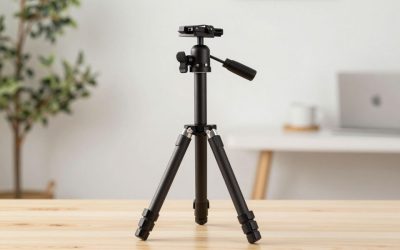
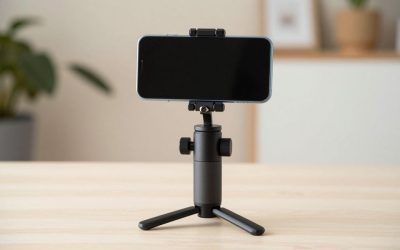
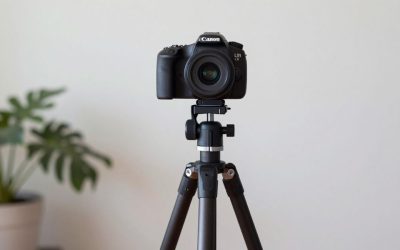
Manfrotto PIXI Mini Tripod
The PIXI is a genuine mini tripod rather than a clamp or stand, which matters if you want to actually move your camera between the desk and another room. It has real locking legs and a proper ball head on a smaller scale, so it works just as well propped on a stack of books to get webcam height as it does flat on a desk.
Pros: true tripod stability in a tiny footprint, portable between setups, supports small mirrorless cameras. Cons: fixed low height means you’ll need to prop it up for proper eye-level framing.
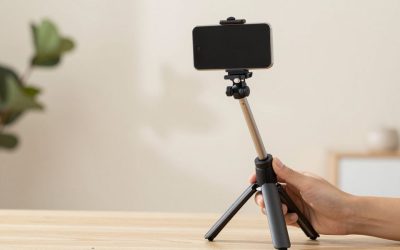
UBeesize Tabletop Tripod with Phone Clip
The budget option here, this tabletop tripod pairs a short adjustable-leg stand with a universal phone clamp, making it a reasonable pick if your “studio” is literally a laptop and a phone propped up for calls. It’s not going to win any build-quality awards, but for the price, it reliably does one job: keep your phone pointed at your face.
Pros: very low cost, lightweight and easy to pack away, works with most phone sizes. Cons: flimsier joints than the other two options over long-term daily use.
Ulanzi Super Clamp Mount (ST-07)
If neither a stand nor a tripod fits your desk, a dedicated clamp mount solves the problem differently: the Ulanzi Super Clamp grips directly onto a desk edge, monitor arm, or shelf lip, then holds a small ball head that a phone or compact camera mount attaches to. It’s the option for anyone whose desk is already crowded with a keyboard, mic arm, and monitor stand, since it adds a camera position without using any actual desk surface.
Pros: frees up desk surface entirely, grips securely once tightened, works with phone clamps and small cameras via standard 1/4-inch threads. Cons: needs a desk edge or compatible surface thickness to clamp onto; not a true freestanding option if you change rooms often.
Cable routing is another detail worth planning before you buy. A gooseneck stand or clamp mount usually leaves a webcam or phone cable dangling across the desk unless you route it along the arm itself, while a tabletop tripod sitting flat tends to keep the cable closer to the desk surface by default. If you’re also running a USB mic arm or a ring light on the same desk, think through how all three arms will physically coexist without colliding when you reach for your keyboard — it’s a common annoyance that’s easy to avoid by measuring clearance first rather than discovering it mid-stream.
Buying tips: measure your actual desk setup before buying — a clamp-style stand needs a desk edge it can grip, while a tripod-style stand needs flat surface space in front of your monitor. If you’re using a laptop’s built-in webcam rather than a phone or external camera, consider whether raising the laptop itself (a stand or stack of books) solves the eye-level problem more simply than any of these.
Also think about how often you’ll be moving the setup. If this is a permanent desk fixture for daily streaming, a slightly larger, more stable stand like the Lamicall is worth the extra desk space. If you regularly switch between a home office and filming elsewhere, the more portable PIXI or UBeesize options make more sense, even though they’re each a small compromise on stability or adjustability.
FAQ
Why does camera height matter so much for video calls?
A camera below eye level forces an unflattering upward angle and makes eye contact with the audience impossible; raising it to eye level is one of the simplest fixes for better-looking calls.
Can I use a phone tripod for my laptop’s webcam instead?
Not directly — these stands are built around phone clamps or small camera mounts, so you’d still need an external webcam or your phone running as a webcam app to make use of them.
Do I need a weighted base if my desk is already sturdy?
A heavy, stable desk reduces the risk, but accidental bumps from typing, reaching for coffee, or a dog brushing past the desk still happen often enough that a weighted base is cheap insurance.
Does the camera angle really matter if the audio and lighting are good?
Audio and lighting carry more of the overall impression, but a bad angle is one of the first things viewers notice, so fixing it with an inexpensive stand is still one of the highest-value small upgrades available.
Is a clamp mount sturdier than a weighted-base stand?
Generally yes, since a properly tightened clamp is mechanically locked to the desk rather than relying on weight alone to resist bumps, but it only works if your desk has a compatible edge for the clamp to grip.
Can I mount a dedicated external webcam instead of a phone on these stands?
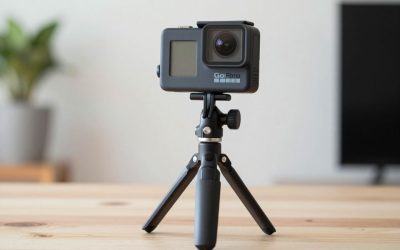
Most of these use a standard 1/4-inch camera thread or a phone clamp with a thread adapter, so a lightweight external webcam usually mounts fine, though it’s worth double-checking your webcam’s own mounting thread before buying.
Write Your Review
No reviews yet. Be the first to share your experience!