Once a vlogger already owns a decent camera, a mic, and a tripod, the next upgrade question is usually some version of: drone or gimbal? Both promise to make footage look more “produced,” and both cost roughly similar amounts of money at the beginner tier — but they solve almost entirely different problems, and buying the wrong one first often means it sits unused while the real gap in your footage stays unfilled.
A gimbal stabilizes handheld, ground-level footage — walking shots, following a subject through a room, a smooth pan across a landscape while your feet stay on the ground. A drone adds an entirely new vantage point — footage from above, wide establishing shots of a location, orbiting shots around a subject or building that are physically impossible to get from the ground no matter how good your stabilization is. If your footage already looks smooth but feels visually flat or repetitive, a drone fixes a different problem than a gimbal does.
DJI Osmo Mobile 7 (Gimbal Pick)
For ground-level stabilization, the Osmo Mobile 7 remains one of the easiest smartphone gimbals to use, with a magnetic quick-mount clamp and tracking modes that follow a subject automatically. It solves shakiness in walking and handheld shots immediately, with almost no learning curve beyond mounting your phone.
Pros: instant improvement to handheld footage, minimal learning curve, compact and travel-friendly. Cons: doesn’t add any new camera angle or vantage point — it only smooths out angles you could already shoot.
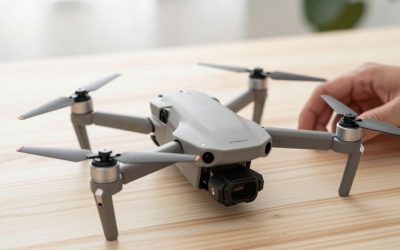
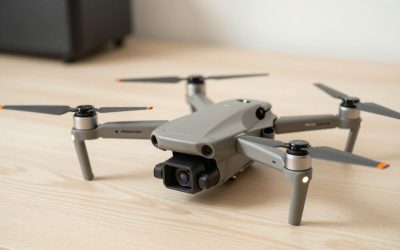
DJI Mini 4 Pro (Drone Pick)
For an entirely new visual dimension, the Mini 4 Pro adds aerial establishing shots, overhead reveals, and sweeping landscape footage that no amount of ground-based stabilization can replicate. It has a real learning curve — flight planning, battery management, basic airspace awareness — that a gimbal simply doesn’t require, but the payoff is footage that looks categorically different from everything else in your video.
Pros: genuinely new footage style unavailable from the ground, obstacle avoidance makes early flights safer, strong 4K image quality. Cons: real learning curve, weather-dependent, and legally restricted in some locations (airports, certain parks, crowded events).
How to choose: if your current footage is shaky or amateur-looking during walking and handheld shots, fix that first with a gimbal — it’s the cheaper, faster, lower-risk upgrade, and a drone won’t fix shaky ground footage at all. If your footage is already smooth but every video looks visually similar — same eye-level angle, same framing — a drone adds the kind of footage variety that makes a video feel more cinematic without changing anything about how you shoot on the ground.
Most established channels eventually own both, and for good reason: a typical well-produced travel or lifestyle video often opens with a drone establishing shot, cuts to gimbal-smoothed walking footage for the middle section, and returns to a static tripod shot for any talking-head segments. They’re complementary tools for different parts of the same video, not competing purchases.
A Third Option: Hybrid Setups
Insta360 Flow 2 Pro: Rather than choosing strictly between a gimbal and a drone, some creators pair a phone gimbal like the Insta360 Flow 2 Pro with occasional rented or borrowed drone footage for key establishing shots, getting the bulk of their stabilized ground footage from the cheaper, always-available gimbal while reserving aerial shots for occasions that specifically call for them.
Legal and practical flight restrictions are worth weighing more heavily than most buyers do upfront. Drones face no-fly zones near airports, parks, and some urban areas, plus registration and Remote ID requirements, while a gimbal has essentially zero regulatory friction — for vloggers who travel to varied locations, a gimbal’s total lack of airspace restrictions is a real, if unglamorous, advantage.
FAQ
Can a drone double as a handheld gimbal when not flying?
No — drones are purpose-built for flight and aren’t designed to be handheld as a stabilizer; trying to use one that way provides no stabilization benefit at all since the gimbal motors are calibrated for flight, not handheld movement.
Which one has a steeper learning curve?
The drone, by a wide margin. Gimbals are close to plug-and-play; drones require learning basic flight controls, battery management, and airspace awareness before you can reliably get usable footage.
Is it legal to fly a drone anywhere I want for vlogging?
No — airspace restrictions near airports, certain government buildings, national parks, and large public events commonly restrict or ban drone flights. Always check local rules for a specific location before flying there.
If I can only afford one this year, which pays off faster in video quality?
For most creators with already-smooth ground footage, a drone creates a bigger visible jump in production value per video, since aerial shots are rarer and more visually striking. For creators whose footage is still shaky and inconsistent, a gimbal is the faster, lower-risk fix.
Can a drone replace a gimbal entirely for vlogging, or do most creators need both?
Most active vloggers end up with both — a gimbal handles the bulk of everyday ground-level footage reliably in almost any location, while a drone is reserved for occasional aerial establishing shots where airspace rules allow flying.
Which is better for a creator who travels internationally — gimbal or drone?
A gimbal travels with far fewer complications, since drones face varying import, registration, and no-fly restrictions by country that can turn a simple trip into a legal research project, making a gimbal the lower-friction choice for frequent international travel.
Write Your Review
No reviews yet. Be the first to share your experience!