Aerial footage is one of the fastest ways to make a vlog, travel channel, or real estate reel look dramatically more professional, and modern beginner drones have made getting that footage far less intimidating than it used to be. You no longer need a pilot’s license or years of practice to launch a drone, fly a smooth establishing shot, and land it safely — the current generation of consumer drones does most of the stabilizing and safety work for you. The hard part now is simply picking the right drone for your budget and your tolerance for risk, since the cheapest options skip safety features that genuinely matter the first few times you fly.
Before buying anything, it’s worth knowing the weight cutoff that matters most in the US: drones under 250 grams don’t require FAA registration for recreational flying (though you still need to follow local airspace rules, and commercial use has separate requirements). That’s why most “easiest to buy and fly immediately” drones are deliberately built just under that line — it removes a paperwork step for casual buyers, not because lighter automatically means safer.
DJI Mini 4 Pro (Best Overall)
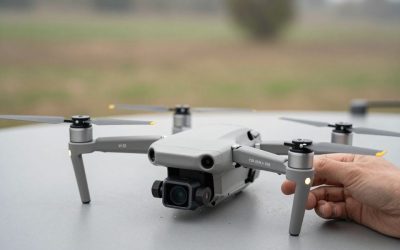
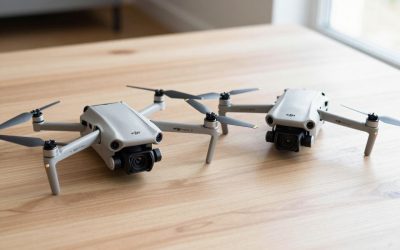
The Mini 4 Pro is the current sweet spot for most new aerial shooters. It sits under the 250g registration threshold, shoots 4K at 60fps, and — critically for a first drone — has omnidirectional obstacle avoidance, meaning sensors on multiple sides actively help it avoid trees, walls, and other obstacles rather than relying entirely on the pilot’s judgment. Flight time lands around 34 minutes per battery, which is long by beginner-drone standards and means less time spent swapping batteries mid-shoot.
Pros: obstacle avoidance genuinely prevents beginner crashes, excellent 4K image quality, under the no-registration weight limit. Cons: costs noticeably more than the non-Pro Mini models; the extra safety sensors are the main thing you’re paying for.
DJI Mini 3 (Best Budget Pick With a Real Camera)
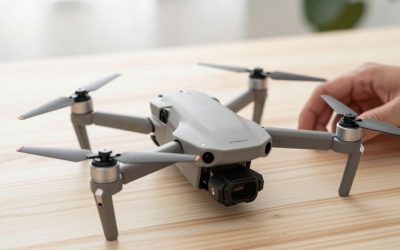
The Mini 3 drops obstacle avoidance entirely, which is the trade-off that makes it meaningfully cheaper than the Pro model. What you keep is a genuinely good camera for the price — sharp 4K footage, a sensor that handles exposure changes well, and DJI’s usual foldable, pocketable design. For someone comfortable flying a bit more carefully and scouting their flight path visually before launching, it’s a legitimate way to get DJI image quality without DJI’s top-tier price.
Pros: strong image quality for the price, lightweight and foldable, simple DJI Fly app pairing. Cons: no obstacle sensors at all, so tight spaces and tree lines require full manual caution.
DJI Neo (Easiest First Flight)
The Neo is DJI’s answer to “I just want to see what flying a drone feels like without committing to a controller.” It launches from the palm of your hand, has built-in propeller guards that make early crashes far less destructive, and can be flown with just a phone — no separate remote required, though one is available if you want more range and precision. It’s the most forgiving drone on this list by a wide margin, which also means its camera and flight time are the most limited.
Pros: genuinely beginner-proof with built-in prop guards, no controller required to start, very low price of entry. Cons: shorter flight time and less capable camera than the Mini series; feels more like a stepping stone than a long-term tool.
How to choose: if budget allows, the Mini 4 Pro’s obstacle avoidance is worth paying for on your first drone — the number of beginner crashes it quietly prevents usually covers the price difference within the first few flights. If you’re confident flying in open areas away from trees and buildings, the Mini 3 gets you the same image quality for less money. If you’re not sure you’ll stick with the hobby at all, the Neo is the cheapest way to find out before committing to a bigger purchase.
FAQ
Do I need a license to fly a camera drone for my vlog?
For purely recreational flying under the FAA’s rules, no formal license is required, though drones 250g and over need to be registered, and you still need to follow airspace restrictions (no-fly zones near airports, for example). If you plan to monetize footage commercially, separate FAA Part 107 rules apply — check current requirements before flying for paid work.
How much flight time do I actually get per battery?
Advertised numbers (30+ minutes on the Mini 4 Pro, for example) are measured in ideal, windless conditions. Real-world flying with wind, cold weather, or aggressive maneuvering typically cuts that by 20-30%, so budget for a spare battery if you’re planning a full shoot day.
Can these drones film in bad weather?
None of the drones above are rated for rain or heavy wind. Light breeze is generally fine, but water exposure can damage the motors and electronics, and manufacturers’ warranties typically exclude weather damage.
Will my existing GoPro or action camera footage match my drone footage in color?
Not automatically — different sensors and lenses produce different color profiles, so expect to do some color matching in your editor if you’re cutting drone shots together with action-camera or phone footage in the same video.
Write Your Review
No reviews yet. Be the first to share your experience!